- Enabled Desktop Experience in Windows 2008 R2 to enable MS Word documents save into SharePoint directly
- All http://Servername:100 change to http://SharePoint
- Setup http://SharePoint:112 for Publishing Portal
- SQL Server 2008 R2 need to enable SQL Server Authentication
- SQL Server sa user status should be enabled and configure password
- Install Northwind Database
- Module 4 Lab 1 Task 6 to join 2 data sources has bug in step 16 and require to fix the XSLT by following this article
- No SMTP setup is required
- Module 6 Lab 1 Step 17 (pg 20 of 27) should change "Send Email" to "Log to History"
- Module 6 Lab 2 Task 7 Step 3 (pg 3 of 6) should change Lookup Manager to Set Variable "manager" to SHAREPOINT\Administrator
- Module 6 Lab 2 Task 10 Step 8 (pg 5 of 6) Contose\sp_member change to Home Members
- Module 6 Lab 3 (pg 3 of 3) last step, the recursive workflow will stop by creating another announcement items and the exception will be log into C:\Program Files\Common Files\Microsoft Shared\Web Server Extension\14\Logs
- Module 6 Lab 4 (pg 6 0f 7), before import, we need to delete the workflow Anywhere from Site Setting->Site Admin->Workflow Settings
- Module 6 Lab 5 (pg 2 of 3) Step 14 is applied to Single Task not Overall Tasks
Friday, November 11, 2011
SharePoint 2010 SharePoint Designer (50354B) Lab
To do the lab in SharePoint 2010 SharePoint Designer course 50354B, we can reuse other SharePoint courses Hyper-V image (e.g. SharePoint 2010 Application Development 10175) with the following configuration:-


Wednesday, November 09, 2011
SharePoint Designer 2010 Data View bug in Join Linked Data Source!
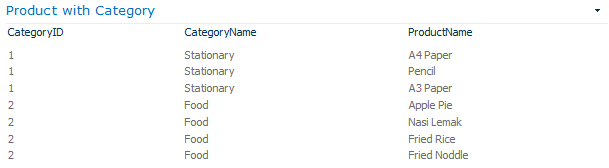
I have 2 Data Sources - Category and Product, I created a Linked Data Source to join these 2 tables using their common key, and created a Data View to access this Linked Data Source, unfortunately the Data View display only the blank data view but with the number of records correct which I can see it from the paging info.

Finally I found out there is a XSLT bug in SharePoint Designer 2010 after spending sometime to troubleshoot this funny problem:-
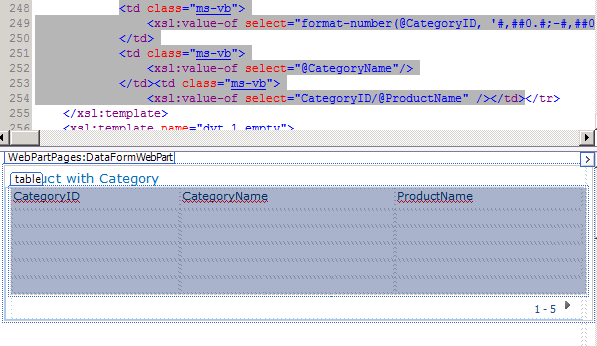
The node is selecting the wrong data source value, we can erase the data source value inside this node and use XPath Expression Builder to find out the actual data source value.

After correcting the data source value by using XSLT Expression Builder, my data view work like charm!
Finally I found out there is a XSLT bug in SharePoint Designer 2010 after spending sometime to troubleshoot this funny problem:-
The

After correcting the data source value by using XSLT Expression Builder, my data view work like charm!
Saturday, October 29, 2011
SharePoint Wiki Link
SharePoint 2010 Wiki Link is powerful! We can create SharePoint Wiki Link by using [[Square Brackets]]
To link to your Wiki Page, type [[Wiki Page Name]], e.g. [[SharePoint]], it will be linked if the Wiki Page is exists else the Wiki Page will be created.

We also can link to any documents or lists using [[List:Path to the list item]], e.g. We have a video clip abc.wmv in Shared Documents, we can link it using [[List:Shared Documents/abc.wmv]]
 You also can link to View using [[View:View Path]]

This feature is enabled in Site Settings/Features/Wiki Page Home Page.

To link to your Wiki Page, type [[Wiki Page Name]], e.g. [[SharePoint]], it will be linked if the Wiki Page is exists else the Wiki Page will be created.

We also can link to any documents or lists using [[List:Path to the list item]], e.g. We have a video clip abc.wmv in Shared Documents, we can link it using [[List:Shared Documents/abc.wmv]]
This feature is enabled in Site Settings/Features/Wiki Page Home Page.

Tuesday, October 04, 2011
BizTalk 2010 Redistributable CAB Files
Windows Server 2008 32-bit Edition
http://go.microsoft.com/fwlink/?LinkID=189407&clcid=0x409
Windows Server 2008 64-bit Edition
http://go.microsoft.com/fwlink/?LinkID=189408&clcid=0x409
Windows Server 2008 R2
http://go.microsoft.com/fwlink/?LinkID=189409&clcid=0x409
http://go.microsoft.com/fwlink/?LinkID=189407&clcid=0x409
Windows Server 2008 64-bit Edition
http://go.microsoft.com/fwlink/?LinkID=189408&clcid=0x409
Windows Server 2008 R2
http://go.microsoft.com/fwlink/?LinkID=189409&clcid=0x409
Tuesday, September 06, 2011
Saturday, July 09, 2011
C# Batch Replace with encoding
Here is the code I wrote for batch replace with GB2312 encoding:-
var dir = new DirectoryInfo(@"D:\hgb");
string strFileName;
string content;
var encoding = Encoding.GetEncoding(936);
foreach (var f in dir.GetFiles("*.htm", SearchOption.AllDirectories))
{
strFileName = f.DirectoryName + @"\" + f.Name;
using (StreamReader reader = new StreamReader(strFileName, encoding))
{
content = reader.ReadToEnd();
content = Regex.Replace(content, "font size=-1", "font size=48");
}
StreamWriter writer = new StreamWriter(strFileName, false, encoding);
writer.Write(content);
writer.Close();
}
var dir = new DirectoryInfo(@"D:\hgb");
string strFileName;
string content;
var encoding = Encoding.GetEncoding(936);
foreach (var f in dir.GetFiles("*.htm", SearchOption.AllDirectories))
{
strFileName = f.DirectoryName + @"\" + f.Name;
using (StreamReader reader = new StreamReader(strFileName, encoding))
{
content = reader.ReadToEnd();
content = Regex.Replace(content, "font size=-1", "font size=48");
}
StreamWriter writer = new StreamWriter(strFileName, false, encoding);
writer.Write(content);
writer.Close();
}
Thursday, July 07, 2011
10175 Lab Correction (SharePoint 2010 Application Development)
General
Lab 2
Lab 4
Lab 8
Lab 10
- Trainer MOC page number may different with student page number.
Lab 2
- There are spacing issues in Exercise 3 Task 4 PowerShell Commands, All *SP Solution commands should be corrected as *SPSolution, e.g. Add-SP Solution should be corrected as Add-SPSolution.
- The -GAC Deployment should be corrected as -GACDeployment
Lab 4
- We should remove the where clause in unfilteredJobs LINQ query from Exercise 3 Task 5 Step 12 then only step 21 All Jobs will be displayed correctly.
- The web.config never changed although the lab works as expected, this issue is caused by access denied, we have to fix it in Powershell:
$svc = [Microsoft.SharePoint.Administration.SPWebService]::ContentService
$svc.RemoteAdministratorAccessDenied = $False
$svc.Update() - We should reference to System.Configuration to use the ConfigurationManager in Exercise 3 Task 2 Step 2.
- When you are instructed to input any object or variable name with spacing, please remove the space, example:- HR Training Management has to be input as HRTrainingManagement.
Lab 8
- There is a list "Mashup" is hidden, we can display it from SharePoint Designer All Files section.
Lab 10
- Please create a site page named Training for Exercise 2 Task 9 Step 3
- You may need to click the Share Documents few times to let the video thumbnails to display accordingly.
- The Microsoft Office is not activated in Hyper-V image and not able to perform Exercise 2 Task 1, workaround is to copy the Metro theme from C:\Program Files (x86)\Microsoft Office\Document Themes 14\Metro.thmx to Desktop
Monday, February 28, 2011
Unsubscribe Tweeter from Maxis
Recently test with Tweeter to try out Mobile notification, after testing try to unsubscribe but failed few times by sms STOP to 28933 Maxis Tweet2Me service.
Finally I can unsubscribed successfully by using this command:-
STOPTWEET2ME to 28933.
Receive the response from Maxis:-
RM0. Your Twitter SMS subscription has been terminated.
Finally I can unsubscribed successfully by using this command:-
STOP
Receive the response from Maxis:-
RM0. Your Twitter SMS subscription has been terminated.
Wednesday, January 12, 2011
Javascript getElementByTagName XML with namespace prefix
How to use Javascript to retrieve XML data with namespace prefix?
Example:-
We can use getElementByTagName together with namespace prefix to access the element value:-
xmlDoc.getElementsByTagName("ns0:POID")[0].firstChild.nodeValue ;
Whole code to access the XML data with namespace prefix via getElementsByTagName:-
<?xml version='1.0' ?>
<ns0:PO xmlns:ns0='http://www.abc.com/PO'>
<ns0:POID>PO123</ns0:POID>
<ns0:CustomerID>ABC007</ns0:CustomerID>
</ns0:PO>
Example:-
We can use getElementByTagName together with namespace prefix to access the element value:-
xmlDoc.getElementsByTagName("ns0:POID")[0].firstChild.nodeValue ;
Whole code to access the XML data with namespace prefix via getElementsByTagName:-
<html><head>


<script language="javascript">


function getXML()


{


var xmlstring = "<?xml version='1.0' ?><ns0:PO xmlns:ns0='http://www.abc.com/PO'><ns0:POID>PO123</ns0:POID><ns0:CustomerID>ABC007</ns0:CustomerID></ns0:PO>";


if (window.DOMParser)


  {


  parser=new DOMParser();


  xmlDoc=parser.parseFromString(xmlstring,"text/xml");


  }


else // Internet Explorer


  {


  xmlDoc=new ActiveXObject("Microsoft.XMLDOM");


  xmlDoc.async="false";


  xmlDoc.loadXML(xmlstring);


  }


var x = xmlDoc.getElementsByTagName("ns0:POID")[0].firstChild.nodeValue ;


alert(x);


}


</script>


</head><body onload="javascript:getXML()">


</body></html>
<?xml version='1.0' ?>
<ns0:PO xmlns:ns0='http://www.abc.com/PO'>
<ns0:POID>PO123</ns0:POID>
<ns0:CustomerID>ABC007</ns0:CustomerID>
</ns0:PO>
Friday, August 13, 2010
BizTalk 2009 Redistributable CAB files
BizTalk 2009
What's new webcast - https://www106.livemeeting.com/cc/microsoftevents/view?id=BTS18AL&role=attend&pw=FGE399
Q&A
Windows XP
What's new webcast - https://www106.livemeeting.com/cc/microsoftevents/view?id=BTS18AL&role=attend&pw=FGE399
Q&A
Windows XP
- 32-bit: http://go.microsoft.com/fwlink/?LinkId=137256
- 64-bit: http://go.microsoft.com/fwlink/?LinkId=137262
- 32-bit: http://go.microsoft.com/fwlink/?LinkID=137166
- 64-bit: http://go.microsoft.com/fwlink/?LinkId=137260
- 32-bit: http://go.microsoft.com/fwlink/?LinkId=137259
- 64-bit: http://go.microsoft.com/fwlink/?LinkId=137263
Wednesday, November 18, 2009
T-SQL Split
I still have seen developer asking me how to Split in SQL Server, although we can enable CLR Integration in SQL Server, here is the classic one from SQL Server Magazine that I have used since SQL Server 2000 and it is very powerful, Treat Yourself to Fn_Split() - This UDF lets you emulate VB's Split() function and parameter arrays
CREATE FUNCTION fn_Split(@sText varchar(8000), @sDelim varchar(20) = ' ')
RETURNS @retArray TABLE (idx smallint Primary Key, value varchar(8000))
AS
BEGIN
DECLARE @idx smallint,
@value varchar(8000),
@bcontinue bit,
@iStrike smallint,
@iDelimlength tinyint

IF @sDelim = 'Space'
BEGIN
SET @sDelim = ' '
END

SET @idx = 0
SET @sText = LTrim(RTrim(@sText))
SET @iDelimlength = DATALENGTH(@sDelim)
SET @bcontinue = 1

IF NOT ((@iDelimlength = 0) or (@sDelim = 'Empty'))
BEGIN
WHILE @bcontinue = 1
BEGIN

--If you can find the delimiter in the text, retrieve the first element and
--insert it with its index into the return table.

IF CHARINDEX(@sDelim, @sText)>0
BEGIN
SET @value = SUBSTRING(@sText,1, CHARINDEX(@sDelim,@sText)-1)
BEGIN
INSERT @retArray (idx, value)
VALUES (@idx, @value)
END

--Trim the element and its delimiter from the front of the string.
--Increment the index and loop.
SET @iStrike = DATALENGTH(@value) + @iDelimlength
SET @idx = @idx + 1
SET @sText = LTrim(Right(@sText,DATALENGTH(@sText) - @iStrike))

END
ELSE
BEGIN
--If you can抰 find the delimiter in the text, @sText is the last value in
--@retArray.
SET @value = @sText
BEGIN
INSERT @retArray (idx, value)
VALUES (@idx, @value)
END
--Exit the WHILE loop.
SET @bcontinue = 0
END
END
END
ELSE
BEGIN
WHILE @bcontinue=1
BEGIN
--If the delimiter is an empty string, check for remaining text
--instead of a delimiter. Insert the first character into the
--retArray table. Trim the character from the front of the string.
--Increment the index and loop.
IF DATALENGTH(@sText)>1
BEGIN
SET @value = SUBSTRING(@sText,1,1)
BEGIN
INSERT @retArray (idx, value)
VALUES (@idx, @value)
END
SET @idx = @idx+1
SET @sText = SUBSTRING(@sText,2,DATALENGTH(@sText)-1)

END
ELSE
BEGIN
--One character remains.
--Insert the character, and exit the WHILE loop.
INSERT @retArray (idx, value)
VALUES (@idx, @sText)
SET @bcontinue = 0
END
END

END

RETURN
END
GO

-- Sample Code for Using Fn_Split() in Pubs to Emulate a Parameter Array

Use Pubs

CREATE  PROCEDURE procPubsTitleView

@sAuthors varchar(8000)
AS
SELECT title, au_lname, price FROM Pubs.dbo.titleview
JOIN dbo.fn_Split(@sAuthors, ',')
ON au_lname = value
RETURN
GO
Saturday, October 31, 2009
Is BizTalk dead?
One of the frequently asked question - Is BizTalk Dead?
The question arises with the announcement of Dublin able to makes long running workflow implemented in Windows Workflow Foundation (WF) persisted in SQL Store, sounds like Biztalk.
More details at A First Look at WF 4.0, “Dublin”, and “Oslo” http://msdn.microsoft.com/en-us/library/dd200919.aspx
I have implemented BizTalk projects in multinational organizations with industry standard like SWIFT, my personal opinion is, no doubt WF, Dublin and Oslo are evolving technologies in application development, but BizTalk still playing as a strong leader in Integration technologies for EAI and B2B, reason being are
BizTalk Server and "Oslo" and .NET
"Oslo" is the codename for Microsoft’s forthcoming modeling platform. Modeling is used across a wide range of domains and allows more people to participate in application design and allows developers to write applications at a much higher level of abstraction. "Oslo" delivers a new integrated platform for connecting across modeling domains, including a new "Oslo" modeling tool, an "Oslo" modeling language, and an "Oslo" repository. As we gathered feedback from BizTalk customers, they indicated they would prefer to take a disciplined, evolutionary path to adopting some of these newer platform technologies. We have thousands of customers that have deployed mission-critical applications on top of our BizTalk Server architecture; they want to decide for themselves when to move to newer versions of the platform.
Therefore, it’s an important guiding principle to our planning efforts that we preserve our customers existing investments in their BizTalk Server infrastructure. In fact, you won’t need to upgrade BizTalk Server to take advantage of "Oslo" – current BizTalk Server 2006 R2 or BizTalk Server 2009 customers can benefit from "Oslo" by being able to leverage and compose existing services into new composite applications. BizTalk Server today provides the ability to service enable LOB systems or trading partners as web services (using WCF supported protocols), which can be composed with the "Oslo" modeling technologies.
This principle applies to advances in the .NET Framework as well, such as Windows Workflow Foundation (WF). In response to customer feedback, we are committed to continued support for BizTalk Server’s XLANG orchestration technology - the existing BizTalk orchestration engine. Additional support for WF will be prioritized for the coming releases based upon customer demand and scenarios.
The question arises with the announcement of Dublin able to makes long running workflow implemented in Windows Workflow Foundation (WF) persisted in SQL Store, sounds like Biztalk.
More details at A First Look at WF 4.0, “Dublin”, and “Oslo” http://msdn.microsoft.com/en-us/library/dd200919.aspx
I have implemented BizTalk projects in multinational organizations with industry standard like SWIFT, my personal opinion is, no doubt WF, Dublin and Oslo are evolving technologies in application development, but BizTalk still playing as a strong leader in Integration technologies for EAI and B2B, reason being are
- B2B industry standard like EDI, SWIFT, RosettaNet contains hundred to thousand schemas and only available in BizTalk as Accelerators. I do not think developers can create all these schema parser easily within short time frame
- BizTalk has many built in Network, Data and Application Adapters like MQ, MSMQ, SAP, Oracle, FTP, and etc and all these can be easily tested by BizTalk engineer, without BizTalk, this will need to develop by developers, I believe this is not a difficult task but also not a straight forward task for developer, and how to unit test all these protocol adpaters required sophisticated knowledge, is our developer have all these knowledge to work with different kind of network, data and application protocols?
- BizTalk Business Activity Monitoring (BAM) is a good integration analytical tool can be easily implemented by Business Analysts, Administrators and Developers, without BizTalk, can developers built this tool?
- Last but not least, from the business point of view, BizTalk has been sold to many multinational organizations and implemented successfully, will Microsoft stone themselves by killing BizTalk?
BizTalk Server and "Oslo" and .NET
"Oslo" is the codename for Microsoft’s forthcoming modeling platform. Modeling is used across a wide range of domains and allows more people to participate in application design and allows developers to write applications at a much higher level of abstraction. "Oslo" delivers a new integrated platform for connecting across modeling domains, including a new "Oslo" modeling tool, an "Oslo" modeling language, and an "Oslo" repository. As we gathered feedback from BizTalk customers, they indicated they would prefer to take a disciplined, evolutionary path to adopting some of these newer platform technologies. We have thousands of customers that have deployed mission-critical applications on top of our BizTalk Server architecture; they want to decide for themselves when to move to newer versions of the platform.
Therefore, it’s an important guiding principle to our planning efforts that we preserve our customers existing investments in their BizTalk Server infrastructure. In fact, you won’t need to upgrade BizTalk Server to take advantage of "Oslo" – current BizTalk Server 2006 R2 or BizTalk Server 2009 customers can benefit from "Oslo" by being able to leverage and compose existing services into new composite applications. BizTalk Server today provides the ability to service enable LOB systems or trading partners as web services (using WCF supported protocols), which can be composed with the "Oslo" modeling technologies.
This principle applies to advances in the .NET Framework as well, such as Windows Workflow Foundation (WF). In response to customer feedback, we are committed to continued support for BizTalk Server’s XLANG orchestration technology - the existing BizTalk orchestration engine. Additional support for WF will be prioritized for the coming releases based upon customer demand and scenarios.
Thursday, October 29, 2009
Developing Business Process and Integration Solutions Using Microsoft BizTalk Server
BizTalk Server (BTS) is a great product from Microsoft and it solves a lot of integration challenges, I have shared this technology with patterns and best practices to many experience BizTalk engineers and developers at Kuala Lumpur.
Course 2933A:
Developing Business Process and Integration Solutions Using Microsoft BizTalk Server 2006
Module 1: Introduction to BizTalk Server 2006
Module 2: Creating Schemas
Module 3: Creating Maps
Module 4: Deploying a BizTalk Project
Module 5: Routing BizTalk Messages
Module 6: Creating Pipelines
Module 7: Integrating with Adapters
Module 8: Creating a BizTalk Orchestration
Module 9: Automating Business Processes
Module 10: Creating Transactional Business Processes
Module 11: Deploying and Managing BizTalk Applications
Module 12:Integrating with Web Services
Module 13: Integrating Business Rules
Module 14: Enabling Business Activity Monitoring
Module 15: Integrating Trading Partners
http://www.metricsthatmatter.com/iversona54
https://www.metricsthatmatter.com/infotrek12
Course 2933A:
Developing Business Process and Integration Solutions Using Microsoft BizTalk Server 2006
Module 1: Introduction to BizTalk Server 2006
Module 2: Creating Schemas
Module 3: Creating Maps
Module 4: Deploying a BizTalk Project
Module 5: Routing BizTalk Messages
Module 6: Creating Pipelines
Module 7: Integrating with Adapters
Module 8: Creating a BizTalk Orchestration
Module 9: Automating Business Processes
Module 10: Creating Transactional Business Processes
Module 11: Deploying and Managing BizTalk Applications
Module 12:Integrating with Web Services
Module 13: Integrating Business Rules
Module 14: Enabling Business Activity Monitoring
Module 15: Integrating Trading Partners
http://www.metricsthatmatter.com/iversona54
https://www.metricsthatmatter.com/infotrek12
Tuesday, August 25, 2009
Connect WSS internal database Microsoft##SSEE using SSMS
Default Windows SharePoint Services internal database can be connected successfully using this connection from SQL Server Management Studio (SSMS):-
\\.\pipe\mssql$microsoft##ssee\sql\query
\\.\pipe\mssql$microsoft##ssee\sql\query
1) Start SSMS and key in the connection |
 |
2) We can access the Microsoft##SSEE now! |
 |
Saturday, July 25, 2009
ASP.NET populates Excel data without Office installed - DSOFile
Do you have any requirements to generate online Excel form from server without Office installed?
Why not download DSOFile from Microsoft website?
The Dsofile.dll files lets you edit Office document properties when you do not have Office installed
Sample Code in C#:-
DSOFile.OleDocumentPropertiesClass d = new DSOFile.OleDocumentPropertiesClass();
string file = Server.MapPath(@"Files\I9.xls");
d.Open(file, false, DSOFile.dsoFileOpenOptions.dsoOptionOpenReadOnlyIfNoWriteAccess);
foreach (DSOFile.CustomProperty cp in d.CustomProperties)
{
if (cp.Name == "Name")
{
object objValue = "YB test on " + DateTime.Now;
cp.set_Value(ref objValue);
}
}
d.Save();
d.Close(true);
System.Runtime.InteropServices.Marshal.ReleaseComObject(d);
Response.Write(file + " [Name] field has been updated successfully");
Why not download DSOFile from Microsoft website?
The Dsofile.dll files lets you edit Office document properties when you do not have Office installed
Sample Code in C#:-
DSOFile.OleDocumentPropertiesClass d = new DSOFile.OleDocumentPropertiesClass();
string file = Server.MapPath(@"Files\I9.xls");
d.Open(file, false, DSOFile.dsoFileOpenOptions.dsoOptionOpenReadOnlyIfNoWriteAccess);
foreach (DSOFile.CustomProperty cp in d.CustomProperties)
{
if (cp.Name == "Name")
{
object objValue = "YB test on " + DateTime.Now;
cp.set_Value(ref objValue);
}
}
d.Save();
d.Close(true);
System.Runtime.InteropServices.Marshal.ReleaseComObject(d);
Response.Write(file + " [Name] field has been updated successfully");
Offshore Development with Agile Software Process
No requirements can get 100% in software development, the better Software Development Process is Agile compared to Waterfall, especially in Offshore Development Business.
This article from Martin Fowler is a good one:-
Using an Agile Software Process with Offshore Development
Documentation in Agile is much lesser compared to Waterfall, but the most important in Agile is user participation.
This article from Martin Fowler is a good one:-
Using an Agile Software Process with Offshore Development
Documentation in Agile is much lesser compared to Waterfall, but the most important in Agile is user participation.
Tuesday, July 15, 2008
Community Launch for Heroes
I have presented LINQ to SQL Introduction on 28 June 2008 (Saturday) at Microsoft Auditorium, details at http://www.microsoft.com/malaysia/events/communityheroes/
Friday, July 11, 2008
BizTalk WCF Oracle Dynamic Send Port
How to implement WCF Oracle Dynamic Send Port? There is an example in Microsoft BizTalk Adapter 3.0 for Oracle Database Documentation:-
Request2(BTS.OutboundTransportType)="WCF-Custom";
Request2(WCF.Action)="http://Microsoft.LobServices.OracleDB/2007/03/SCOTT/Table/ACCOUNTACTIVITY/Select";
Request2(WCF.BindingType) = "oracleDBBinding";
Request2(WCF.UserName)="SCOTT";
Request2(WCF.Password)="TIGER";
SendPort(Microsoft.XLANGs.BaseTypes.Address)="oracledb://adapdoc/";
If you deployed the code may hit the error:-
Event Type: Error
Event Source: BizTalk Server 2006
Event Category: BizTalk Server 2006
Event ID: 5754
Date: 7/3/2008
Time: 11:21:31 AM
User: N/A
Computer: AMSDC1-S-7538
Description:A message sent to adapter "Oracle" on send port "OracleDynamicSendPort_1.0.0.0_OracleDynamicSendPort.OracleSend_Port_DynamicOracle_beec5c3523602cdb" with URI "oracledb://TNSNAME/?PollingId=1" is suspended. Error details: Value cannot be null.Parameter name: s MessageId: {A7F0A852-C315-4521-9B63-E0BFE221F4AE} InstanceID: {FF53A23E-3F21-4098-A02B-8381E6C3D851}
The solution is to add additional line in the code above:-
SendPort(Microsoft.XLANGs.BaseTypes.TransportType) = "WCF-Custom";
Then this exception will be resolved.
NOTE: to use the WCF Oracle Dynamic Send Port, the Adapter's default send handler, i.e. the BizTalk hosts must be running.
Request2(BTS.OutboundTransportType)="WCF-Custom";
Request2(WCF.Action)="http://Microsoft.LobServices.OracleDB/2007/03/SCOTT/Table/ACCOUNTACTIVITY/Select";
Request2(WCF.BindingType) = "oracleDBBinding";
Request2(WCF.UserName)="SCOTT";
Request2(WCF.Password)="TIGER";
SendPort(Microsoft.XLANGs.BaseTypes.Address)="oracledb://adapdoc/";
If you deployed the code may hit the error:-
Event Type: Error
Event Source: BizTalk Server 2006
Event Category: BizTalk Server 2006
Event ID: 5754
Date: 7/3/2008
Time: 11:21:31 AM
User: N/A
Computer: AMSDC1-S-7538
Description:A message sent to adapter "Oracle" on send port "OracleDynamicSendPort_1.0.0.0_OracleDynamicSendPort.OracleSend_Port_DynamicOracle_beec5c3523602cdb" with URI "oracledb://TNSNAME
The solution is to add additional line in the code above:-
SendPort(Microsoft.XLANGs.BaseTypes.TransportType) = "WCF-Custom";
Then this exception will be resolved.
NOTE: to use the WCF Oracle Dynamic Send Port, the Adapter's default send handler, i.e. the BizTalk hosts must be running.
Thursday, April 06, 2006
New Web Site created
Just created a new website http://www.kuala-lumpur-guide.com/ to share what is Kuala Lumpur included dark side information
Monday, February 20, 2006
WebSphere MQ Samples
Sample code for accessing Webphere MQ in Microsoft C#, VB6 and VB.NET
http://www.capitalware.biz/mq_code_csharp.html
http://www.capitalware.biz/mq_code_csharp.html
Subscribe to:
Posts (Atom)